
Rigid rails for a steadier cut
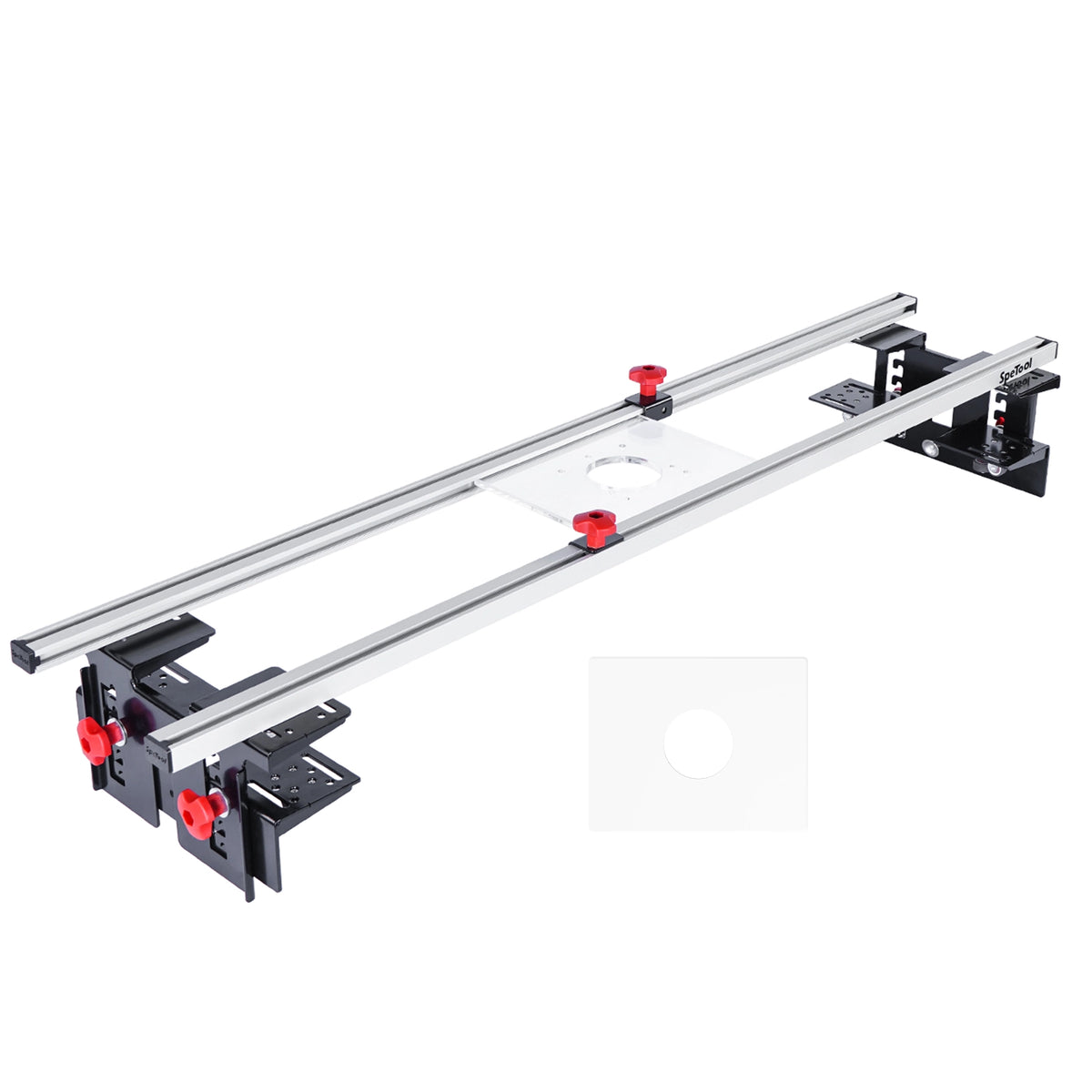
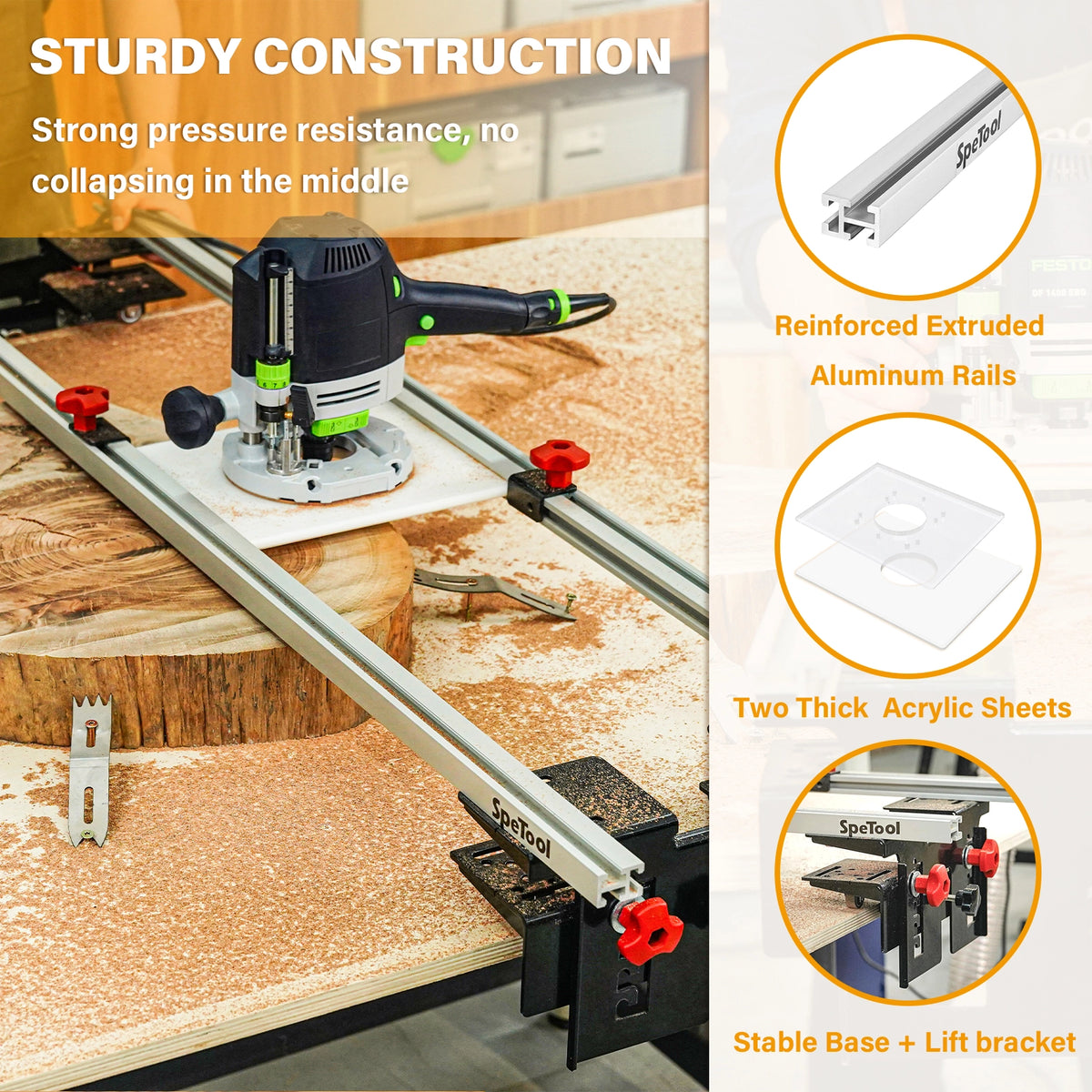
High-strength 6061 anodized aluminum rails are engineered to resist bending and warping. Laser-cut preset Z-axis positions help you set both ends consistently for even passes.


A flatter slab starts here
Flatten wide wood slabs with your router. Build a guided setup for live-edge tables, worktops and workshop projects.
Cutting width changes with the S01002 shroud and your bit diameter. Match your router base and table before choosing.
Check cutting widthCheck router fitCheck height & bit reachSled only: router, surfacing bit, S01002 shroud, vacuum and worktable are not included.
Why Cratos
Built to help you turn rough slabs into project-ready surfaces, with practical details that make mounting, setting height and moving the router easier.

High-strength 6061 anodized aluminum rails are engineered to resist bending and warping. Laser-cut preset Z-axis positions help you set both ends consistently for even passes.
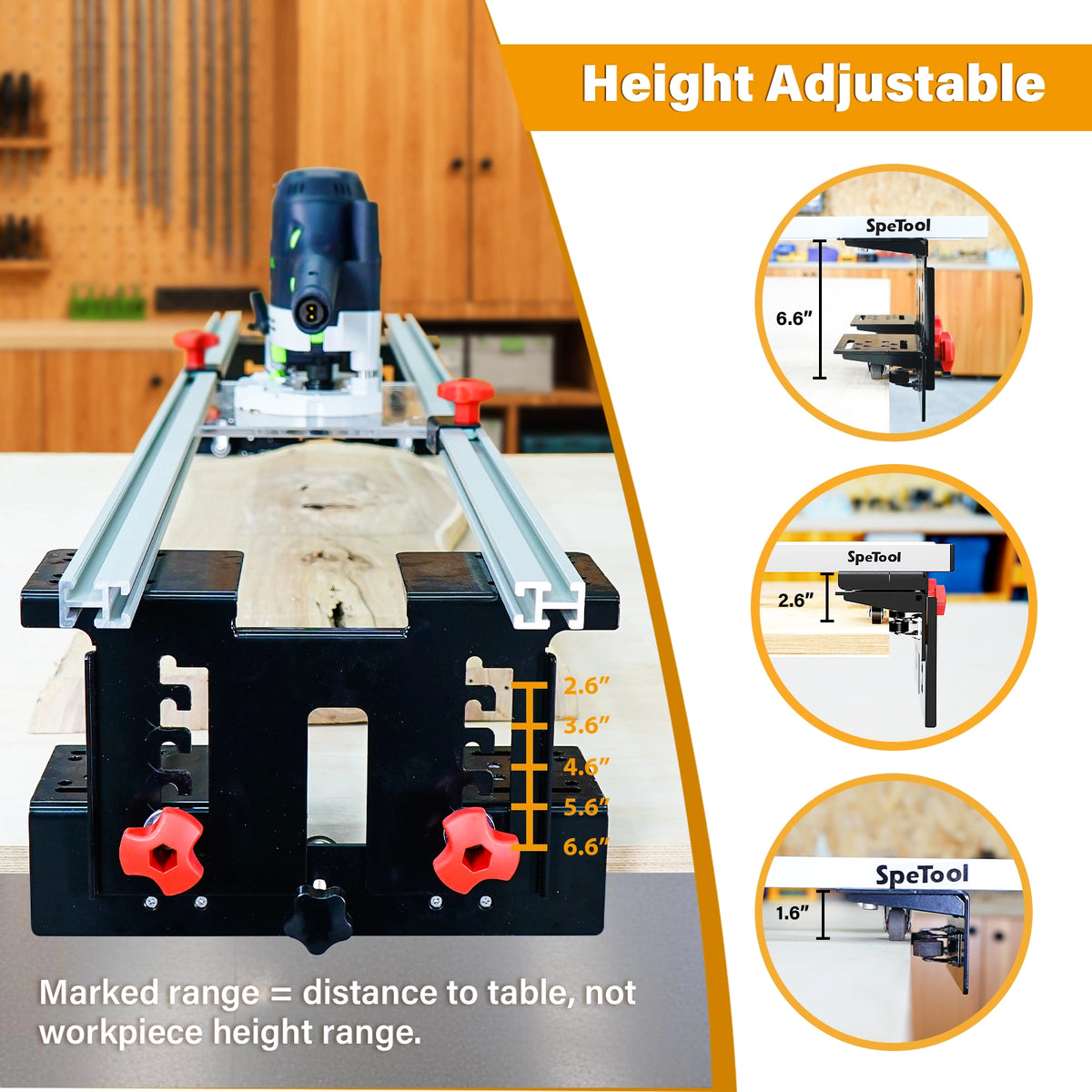
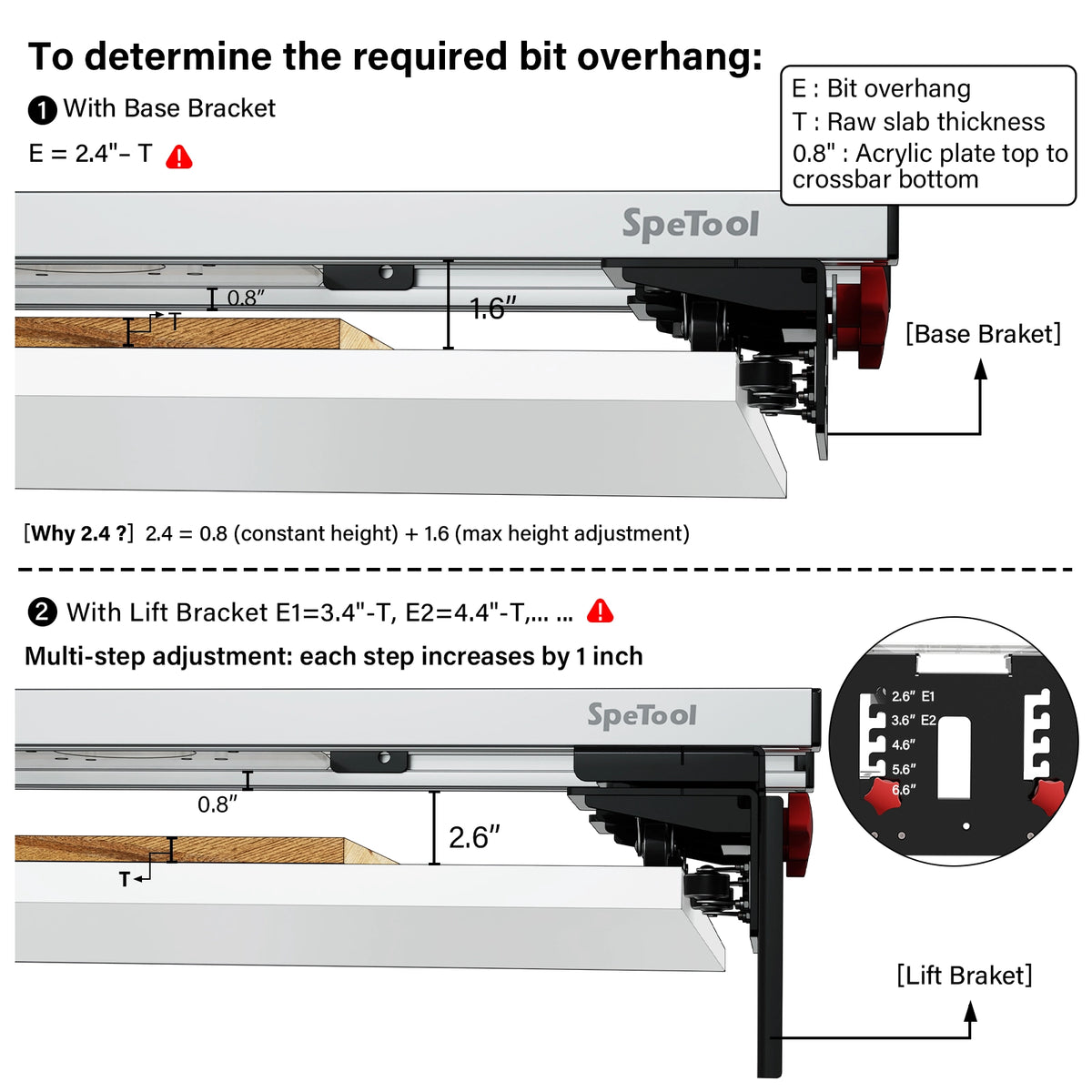
Use the base bracket for low setups, or choose one of five lift positions. Seat both sides at the same setting and tighten before routing. Check cutter reach for thinner stock.
The slide-in bracket design makes router insertion straightforward. Keep the roller paths free of chips so debris does not change the height of your pass.
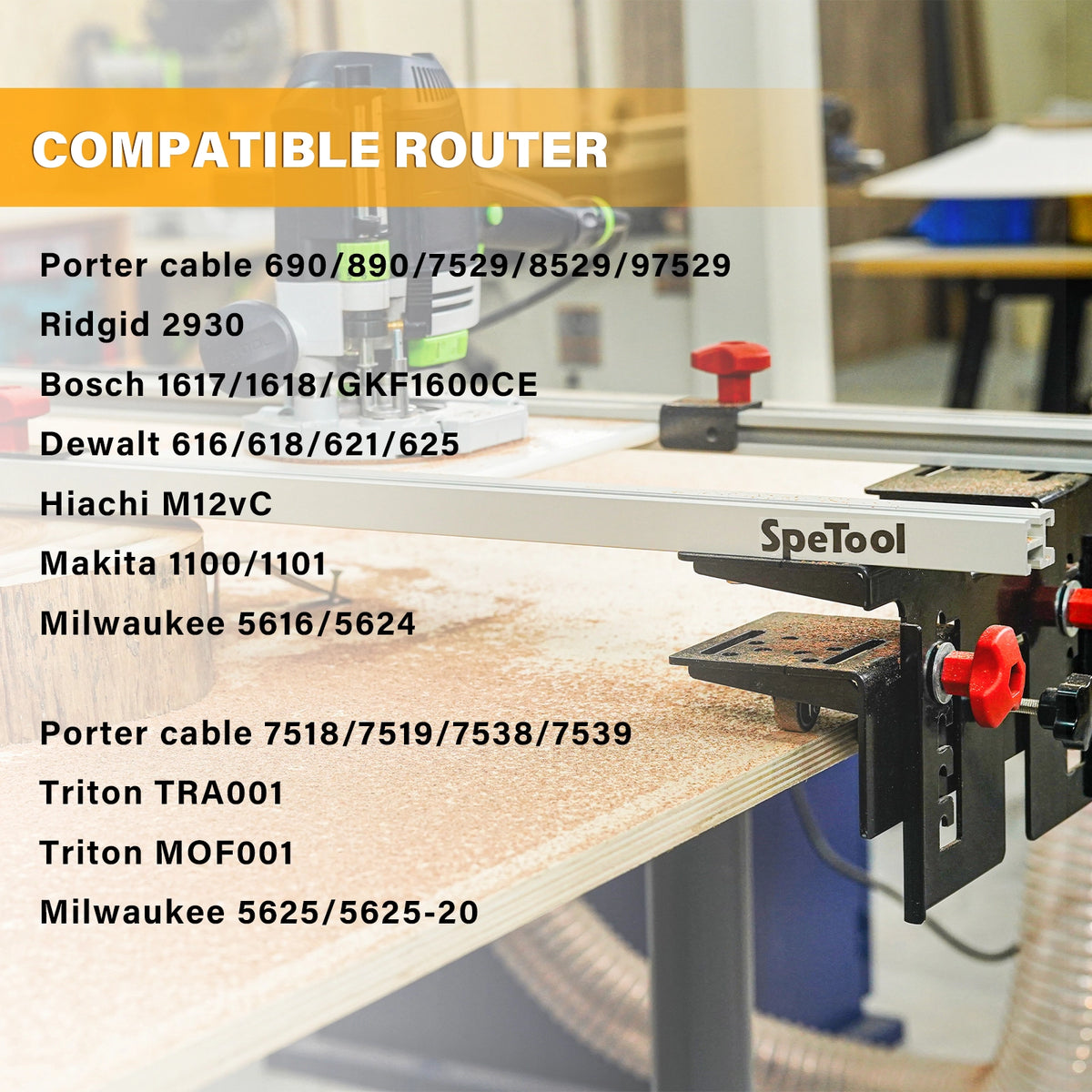
Use the pre-drilled plate for the listed router models, or drill the supplied blank plate to suit an unlisted mounting pattern. Check the exact model and base below.
Supplied workpiece clamps and router-mounting screws help you get set up. Choose the right screw thread and length for your router; not every fastener fits every model.
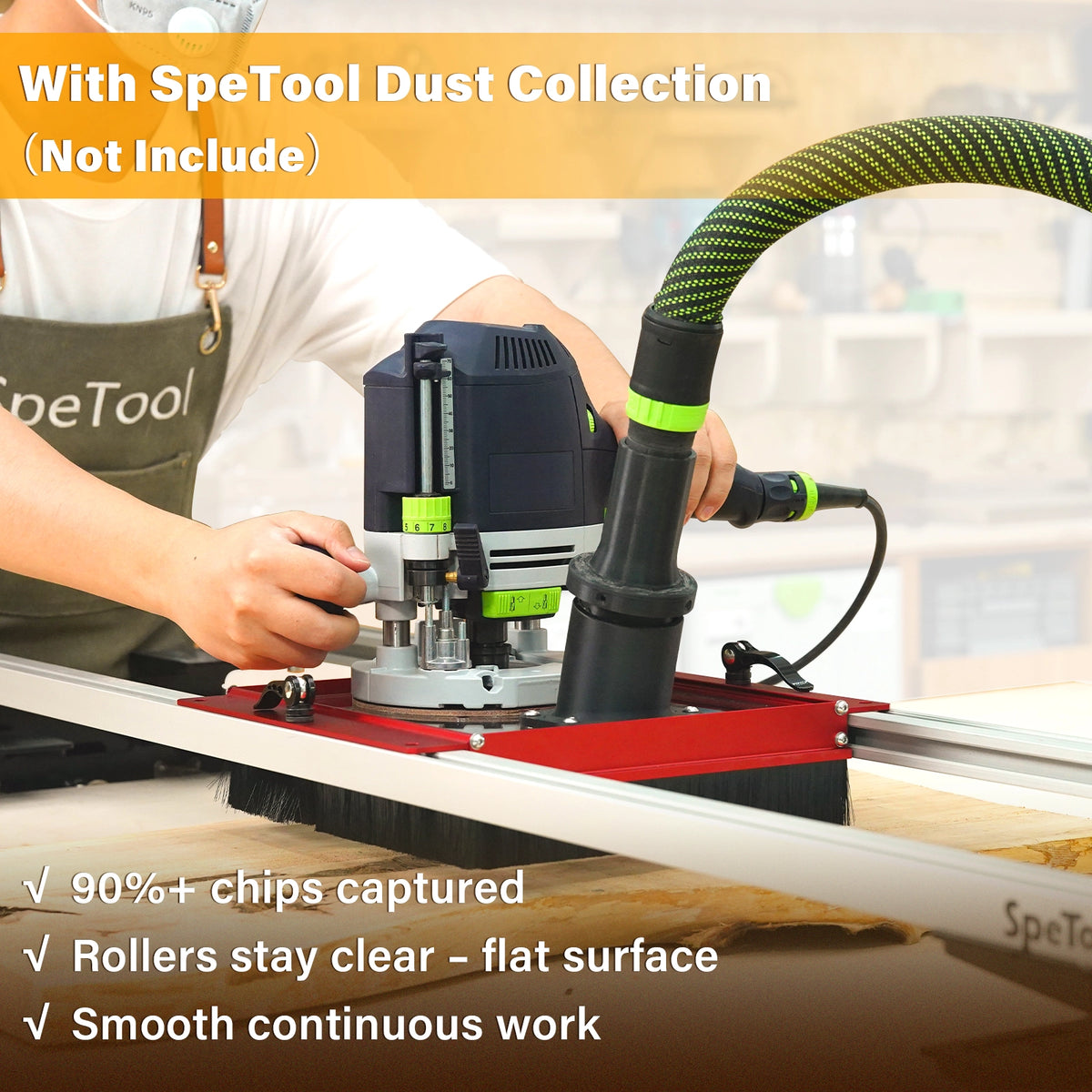
Pair with the optional S01002 shroud and suitable extraction equipment to help collect chips as you work. Check both cutting width and bit reach when adding the shroud.
Compare sled and bundle optionsPatent notice: this product is protected by one or more patents in certain jurisdictions.
From rough slab to your next project
Use your router to surface a slab that needs flattening before sanding and finishing. Start with a stable, supported setup and check the dimensions below.
Prepare wide wood slabs for the next stage of your table build.
Guide the router across supported workpieces with repeatable passes.
Choose the sled alone or pair it with a shroud and a compatible surfacing bit.
01 / Will it cover my project?
The 48-inch product label is not a promise of 48-inch cutting coverage in every configuration. Use the setup-specific dimensions below.
Without S01002
1200 mm + D47.24 in + bit diameterWith S01002 installed
950 mm + D37.40 in + bit diameterMaximum table width
1350 mm53.15 in · table fit, not cutting widthD = surfacing bit diameter. Add dimensions in the same units. Coverage is measured along the main rails.
1350 mm is the maximum table width, not the maximum slab cutting width. A narrower table still needs suitable support and clearance. Longitudinal reach and usable workpiece thickness depend on your full setup; contact us with your dimensions if unsure.
02 / Will my equipment fit?
Match your exact model and base to hole group A or B on the pre-drilled plate. A and B are hole patterns, not separate plates. Unlisted models may need the supplied DIY blank plate.
Bosch 1617 / 1618: the listed compatibility is for the fixed base.
Measure table width, support layout and workpiece dimensions. Maximum table width is 1350 mm (53.15 in). Confirm wheel support, mounting clearance and secure workholding.
Match the cutter shank to your router collet and check the cutter clearance. S01002 is an optional shroud; a suitable extraction setup is also required. Recalculate coverage when adding the shroud.
Select the brand and exact model shown on your router. A listed hole pattern is the starting point; check your base, screws and installed clearances.
| Hole group | Listed router models |
|---|---|
| A | Porter-Cable 7518 / 7519 / 7538 / 7539 Triton TRA001 / MOF001 Milwaukee 5625 / 5625-20 |
| B | Porter-Cable 690 / 890 / 7529 / 8529 / 97529 Ridgid 2930 Bosch 1617 / 1618 / GKF1600CE DeWalt 616 / 618 / 621 / 625 Hitachi M12VC Makita 1100 / 1101 Milwaukee 5616 / 5624 |
Bosch 1617 / 1618: this listing applies to the fixed base, not the plunge base.
Reference: S01001 Cratos Pro manual, mounting page. Confirm the plate supplied with your product version. Similar names and unlisted suffixes do not automatically share a confirmed mounting pattern.
It is the second, un-drilled mounting plate (PA in the manual). It lets you make holes that match your router’s own base pattern; it is not a universal pre-drilled plate.
A router shown in a product photo is not, by itself, confirmation of pre-drilled compatibility.
Before choosing your cutter
Choose your bracket position and whether you will use S01002. Enter the raw slab thickness to estimate the reach needed from the top of the mounting plate to the uncut surface.
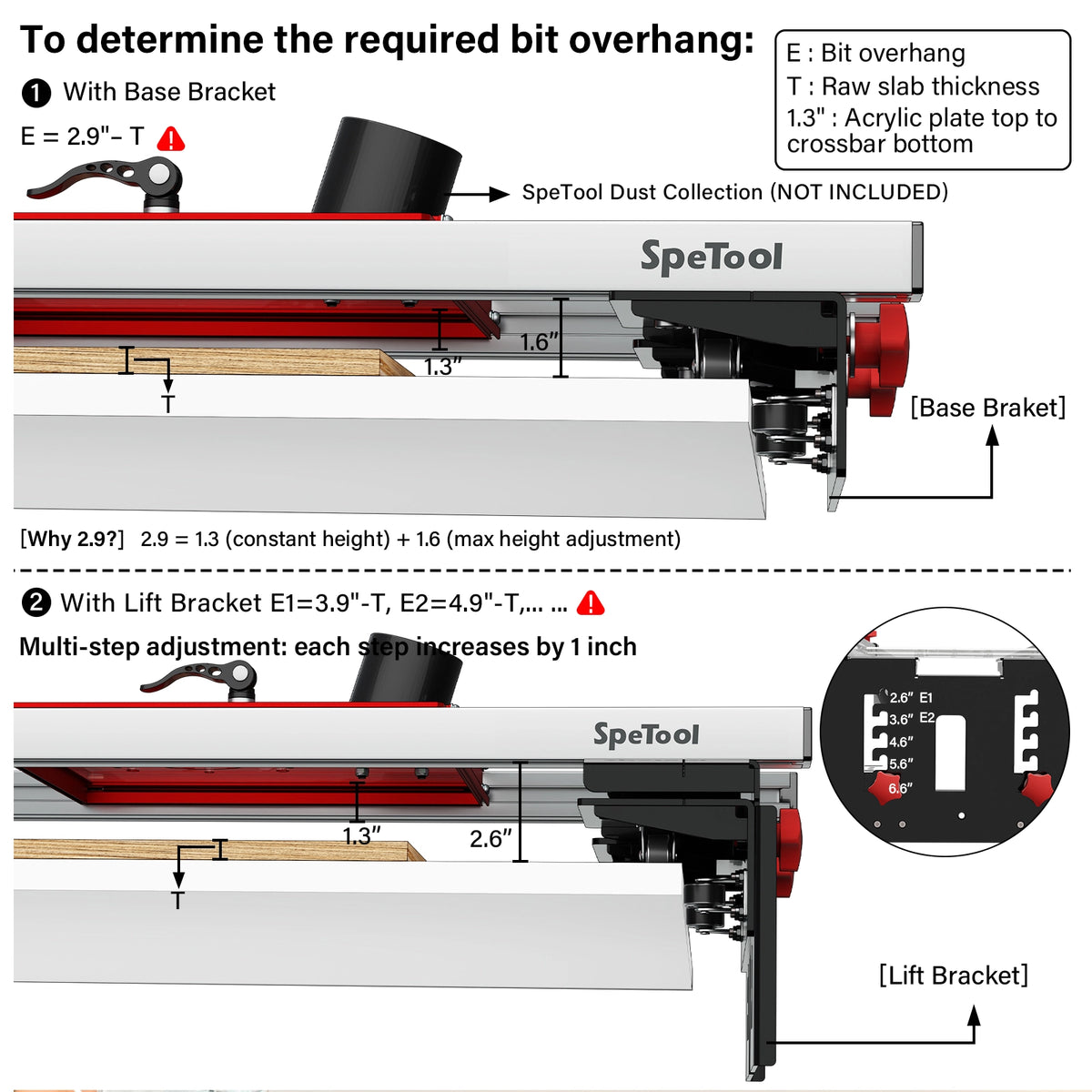
Without S01002: E = H + 0.8 in − T. With S01002: E = H + 1.3 in − T. H is the selected crossbar-to-table height. Base H = 1.6 in; lift H = 2.6, 3.6, 4.6, 5.6 or 6.6 in. Convert all measurements to the same units.
E is a plate-to-cutting-edge distance, not a recommendation to pull the bit farther out of the collet. Maintain the router and cutter makers’ required shank engagement. Any collet extension needs separate compatibility and speed-limit checks.
03 / What do I need to order?
Start with the missing pieces in your workshop. These options use the current product prices for your region.
I already have a bit

S01001 sled, pre-drilled and blank mounting plates, workpiece clamps and supplied mounting hardware.
You provide: compatible router, surfacing bit and a stable, supported worktable. Confirm that the supplied clamps suit your workpiece.
€262,47 EUR
Choose sled onlyBundle & Save

S01001 router sled + S01002 dust collection shroud.
You provide: router, compatible bit, table, workholding and suitable vacuum / extraction connection.
With shroud: cutting width = 950 mm + bit diameter.
€355,32 EUR
View this configurationBundle & Save

Router sled, dust shroud, surfacing bit and replacement inserts. Check the model and shank size on the bundle page.
S01001 + S01002 + W05008 ATS + O01004
You provide: compatible router, stable table, workholding and suitable vacuum / extraction connection.
With shroud: cutting width = 950 mm + bit diameter.
€457,47 EUR
View this configurationBundle offers vary. Check current prices for your chosen setup. Applicable discounts, shipping and taxes determine your final total at checkout.
04 / How do I get started?
Follow the manual to assemble the sled. Support the table and secure the workpiece so it cannot move.
With power disconnected, mount the correct plate and router. Check cutter clearance, travel and any extraction connection.
Follow your router and cutter instructions for speed and cut depth. Test the setup, then work in controlled passes before sanding.
This overview does not replace the product, router or cutter instructions. Setup and safe operating limits depend on your equipment.
Read the full setup instructions →The details that make the decision easier
No. Along the main rails, effective cutting coverage is 1200 mm plus your surfacing bit diameter without S01002, or 950 mm plus the bit diameter with S01002 installed. Use the same units when adding. Check equipment compatibility separately.
The maximum table width is 1350 mm (53.15 in). This is the table fit dimension, not the cutting width. Maximum width alone does not confirm that a narrower table provides suitable support. Share your table dimensions and support layout with us if you are unsure.
The S01001 sled includes a pre-drilled router plate, a blank DIY plate, workpiece clamps and mounting hardware. Choose fasteners that match your router. The sled-only option excludes the router, surfacing bit, S01002 shroud, vacuum and worktable. Bundle contents vary; check the exact included models and shank size on the selected bundle page.
Bundle savings vary with current offers; there is no fixed discount across every configuration. Individual items may also be discounted. Compare the same components and quantities, and check the final total at checkout.
Select your destination using the store region selector, then check the shipping and return policy links near the purchase button. Delivery options and the final charges are confirmed at checkout. Return conditions and return-shipping responsibility depend on the reason for return; review the policy before ordering.
Longitudinal working length depends on your table and support arrangement, rather than the transverse width formula. Support and secure the workpiece along its full travel and check end clearances. Send us the length, width, thickness and table layout for a large slab; the word “unlimited” is not a substitute for a support plan.
Use the model checker and the A/B hole-group table above. A and B are patterns on the pre-drilled plate. Bosch 1617/1618 listings apply to fixed bases. The second, blank PA plate provides a DIY drilling option for unlisted mounting patterns; confirm the base, fasteners and clearance rather than relying on brand alone.
With S01002 installed, transverse coverage is 950 mm plus the bit diameter, compared with 1200 mm plus the bit diameter without it. For example, a 63.5 mm (2.5 in) bit gives 1013.5 mm (39.90 in) with the shroud or 1263.5 mm (49.74 in) without it. This is a calculation example, not a bit-size recommendation.
No. They show the crossbar-to-table distance: 1.6 inches with the base bracket and 2.6, 3.6, 4.6, 5.6 or 6.6 inches with the lift bracket. Usable slab thickness depends on the mounted plate, cutter reach, shroud and clearances. The height checker helps estimate reach; the markings alone do not confirm a slab will fit.
In the supplied geometry, the mounting-plate offset changes from 0.8 inches without S01002 to 1.3 inches with it. For the same bracket setting and raw slab thickness, S01002 therefore adds 0.5 inches (12.7 mm) to the required plate-to-cutting-edge reach. The base formulas are E = 2.4 − T inches without S01002 and E = 2.9 − T inches with it.
Possibly. A thin slab, higher lift setting or S01002 can increase the reach required. Start with the lowest bracket position that provides clearance and compare the estimate with your safely configured router and bit. Do not reduce required shank engagement to gain reach. An extension must be approved for your router, collet, cutter and operating speed; the calculator does not select or approve one.
Use your router manual’s mounting dimensions to mark the supplied blank PA plate. Support and clamp it securely; the S01001 manual recommends a drill press and pilot holes. Check the cutter opening, screw thread and length, then verify secure seating and clearance with power disconnected. Ask for help before drilling if the mounting layout is uncertain.
The checked manual’s pre-drilled A/B table does not list Festool OF1400. A photo does not establish direct fit. The blank plate is the custom-drilling route; confirm your router base dimensions and installed clearances before ordering.
No automatic match is established. GKF1600CE is listed under hole group B; GOF1600CE and TREND T8 are not listed in the checked table. Their base patterns, fasteners and clearances need separate confirmation, with the blank plate as a potential DIY route.
A hole-pattern match identifies the mounting layout; it does not establish every load or operating limit. A maximum router mass and allowable rail deflection are not specified in the checked manual. Send the exact model and intended setup if you need confirmation for an unusually heavy router.
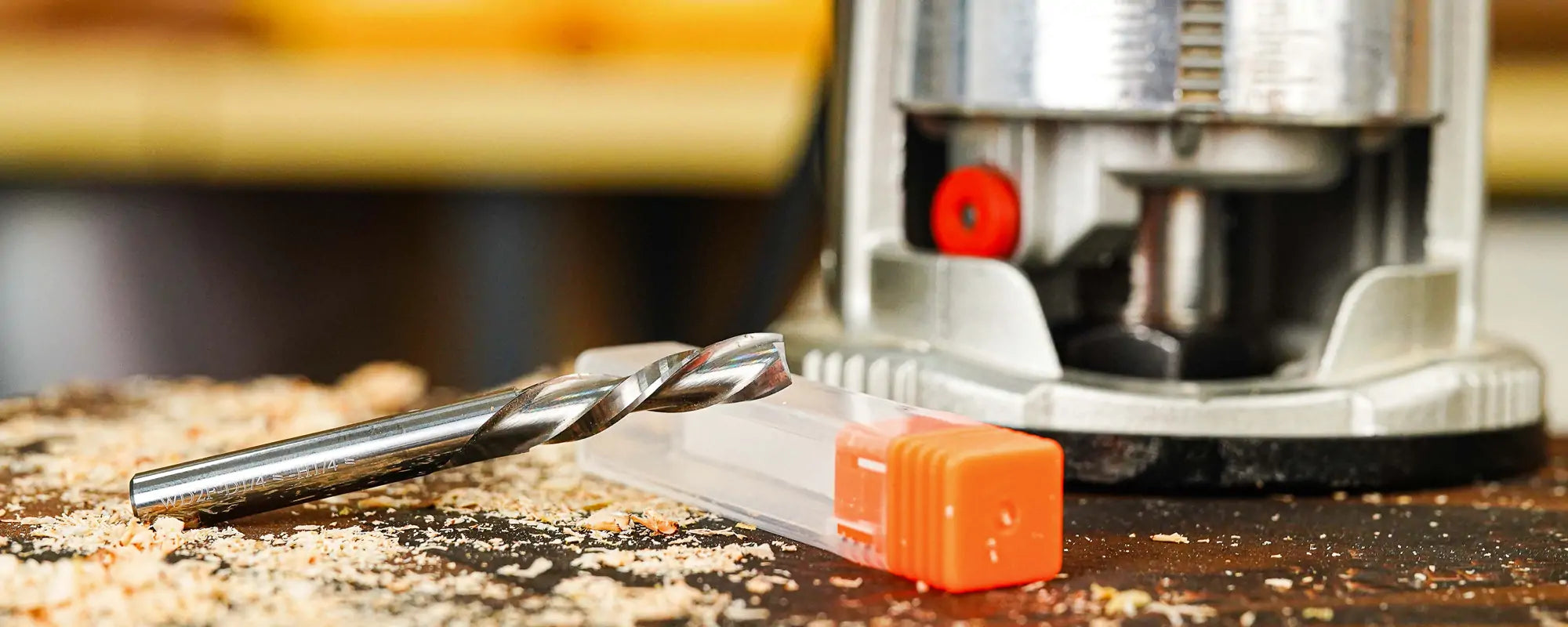
Match the shank to your router collet and check the router’s permitted cutter size and speed. Verify clearance through the mounting plate and S01002 if fitted, then check reach and cutting coverage. The width calculator’s examples are not cutter-size recommendations. Confirm the actual bit model and shank included in a bundle.
Stop the router, wait for the cutter to stop and disconnect power. Use a soft brush and vacuum to remove accessible chips from wheel surfaces and the surfaces they run on. Move the unpowered sled by hand to check for smooth travel. Debris under a wheel can lift the sled and change cutting depth, so keep these paths clear between passes.
Pause use if a wheel remains stiff, rough or seized after accessible debris is removed. Do not force the sled through a cut. Send your S01001 version or serial number and clear photos of the affected wheel and its mounting to support. Internal cleaning, adjustment or replacement must be matched to the wheel assembly; this page does not prescribe bearing disassembly, lubrication or compressed-air pressure.
You can still ask us to identify the part. Send the product version or serial number and clear stationary photos of the wheel and mounting; include an order number if available. We will need to confirm the correct wheel, availability and price. A previous replacement case does not guarantee current stock or a free replacement.
With power disconnected, check for chips under the wheels, consistent bracket settings on both sides, secure router mounting and stable workpiece support. Check cutter condition and the router/cutter instructions before another test pass. If unevenness persists, send setup photos and describe where it appears; the cause cannot be diagnosed from the surface mark alone.
Small brushes have been suggested as a way to keep roller paths clear, but a specific bolt-on brush kit is not confirmed here. Start with power-off brushing and vacuuming of accessible debris. Do not let an added brush interfere with travel or the cutter. Follow the equipment maker’s instructions for any compressed-air cleaning; it is not a confirmed remedy for a seized bearing.
S01002 is an optional chip-collection shroud that needs a suitable extraction connection. Collection depends on airflow, the hose connection, cutter, material and setup; it does not replace keeping the wheel paths clear. Check the changed cutting width and cutter-reach requirements before adding it.
Check your router, cutting width and cutter reach, then choose your setup.
Sign up to get the latest woodworking tools, deals, and DIY ideas from SpeTool!
Be the first to know about new product launches, special offers, and inspiring woodworking projects—straight to your inbox.
By entering your email, you agree to receive marketing messages from SpeTool. You can update your preferences or unsubscribe anytime. See our Terms and Conditions & Privacy Policy.